Web Submission Integration
- Designed for business users only. For big platforms to integrate LegitApp API.
- All time in this documentation refers to UTC +0
- Last updated on: 2026 September 4
- Developer Portal: http://developer.legitapp.com/
- Developer Portal (Sandbox): http://developer-a7zu.legitapp.com/
Flow Diagram
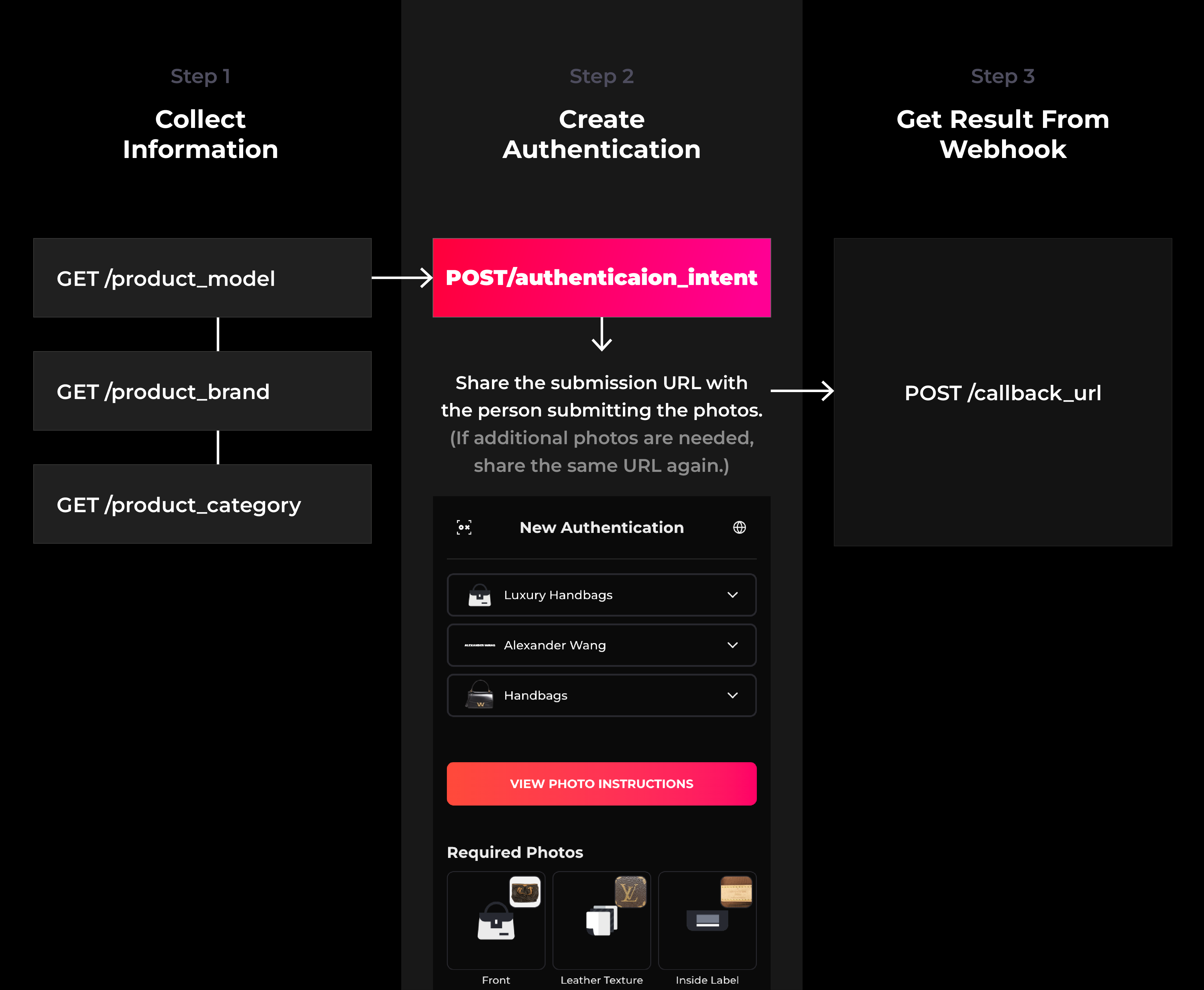
Overview
The LegitApp Developer API enables third-party applications to integrate LegitApp's authentication services into their systems with API and/or Web Submission. This RESTful API uses JSON for all request and response formats.
Workflows
Follow the steps below to create and share an authentication request.
Step 1: Create an Authentication Intent
Use the API endpoint 1-4 listed below to create a new authentication intent. This intent acts as a placeholder for the entire authentication process and is valid only for 30 days from the time it is created. When creating an authentication intent, the creator can optionally include extra information to control or customize the authentication process:
- Configure Authentication Restrictions
- Specify
category_id,brand_id, andmodel_idto require the item being authenticated to match the selected category, brand, and model. - Set
tag_enabledtotrueto require the recipient to use a physical tag during authentication. - Set
user_custom_code_enabledtotrueto require the recipient to enter a custom code during authentication. Alternatively, provideuser_custom_codewhen creating the authentication intent. This pre-fills the code and reduces the risk of recipient input errors.
- Specify
- Set Display Language
- You can also choose the
languagefor the authentication page. - The authentication URL shared with the recipient will then display in the selected language.
- You can also choose the
Share the authentication URL in the intent with the person who needs to complete the authentication. The recipient can use this link to:
- Create a new authentication, and/or
- Upload additional photos to the authentication if required.
⚠️ Anyone with access to the authentication URL can complete the authentication process. Handle the URL carefully, and only share it with the person who genuinely needs to authenticate.
The intent also comes with an Authentication Intent ID. This value will be identical to the Case ID of the authentication submitted later. This makes it easy to track and match intents with their final authentications.
Example of an intent object:
{
    "authentication_intent_id": "4147106584014339",
    "authentication_url": "https://submit.legitapp.com/zh-Hant/authentication/ailive32fc0b5ebc14afc40a559990215295ce73ea94ac543b45e395d79ac82c6c8ecbe798dedc67ae8cc4acd8f5333a2f7201673844d9449a448939656250e876b53387741c9620b8755c807c48bf27ca7b10f801e01e1ef0128bc6802f8b6514a0c8f3b3124024e8d985993303ad152fda7aedc76e4336cb5f4e92",
    "expired_at": "2025-10-05T10:35:32.447Z"
}
Step 2: Complete the Authentication
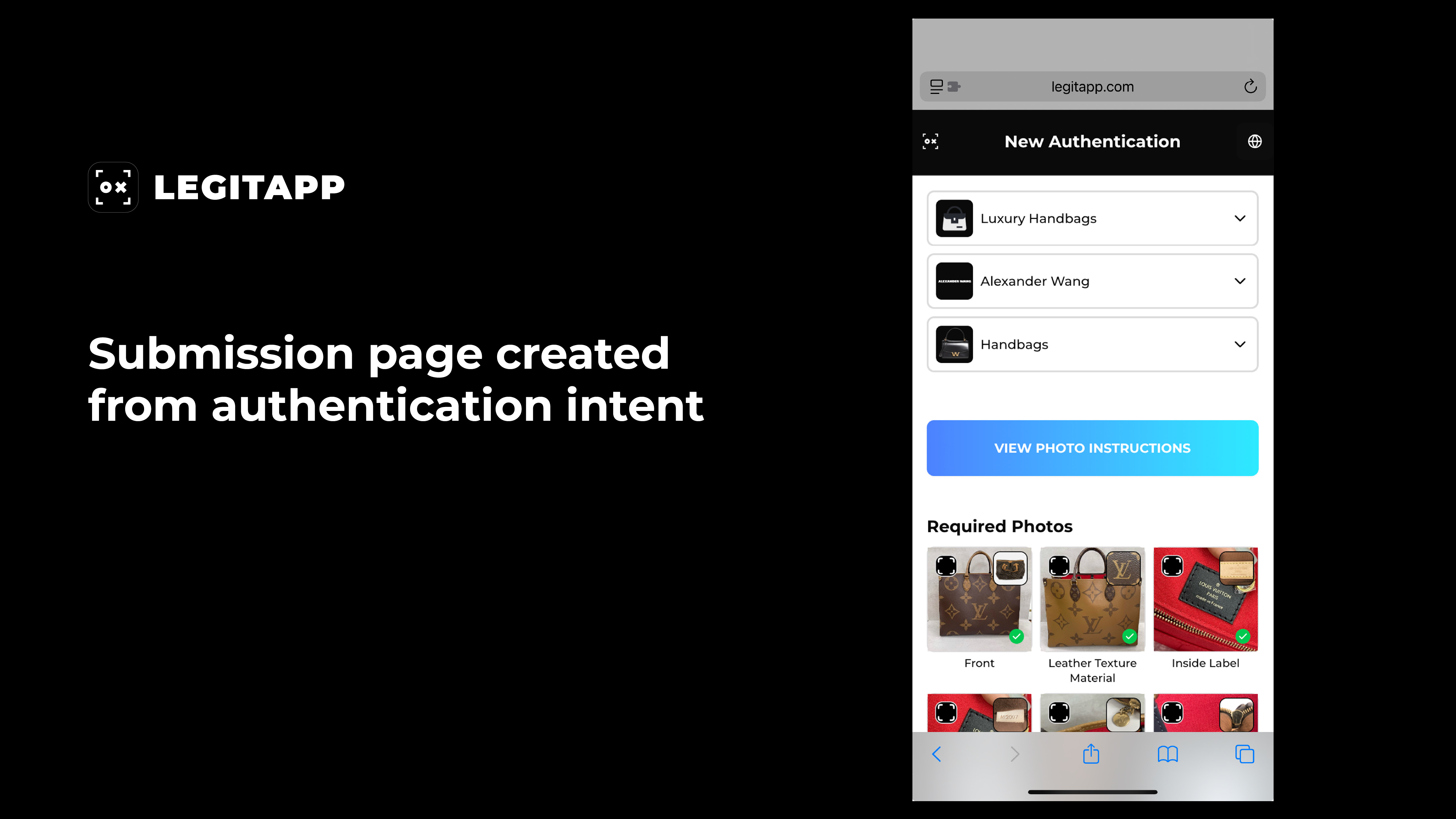
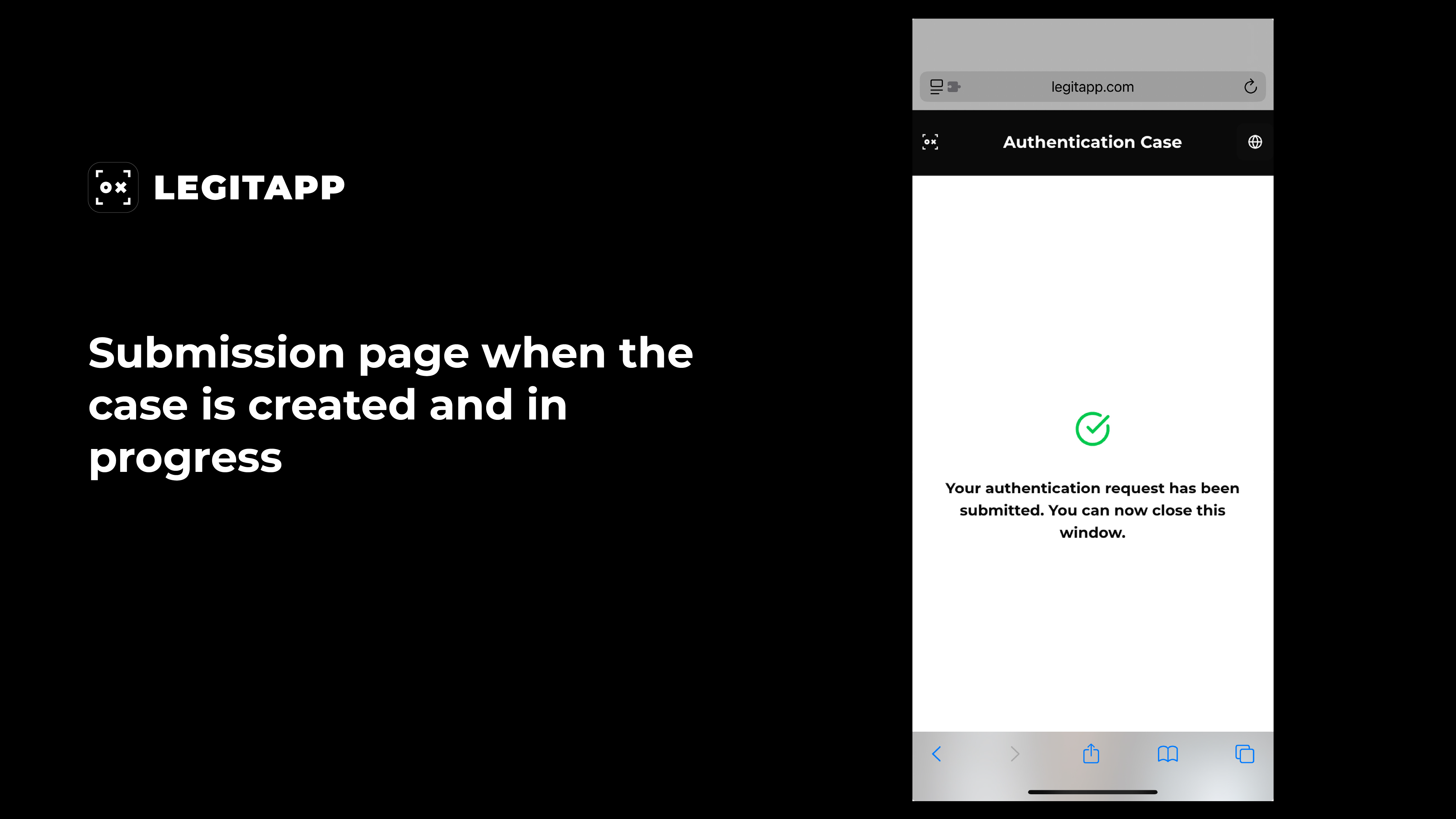
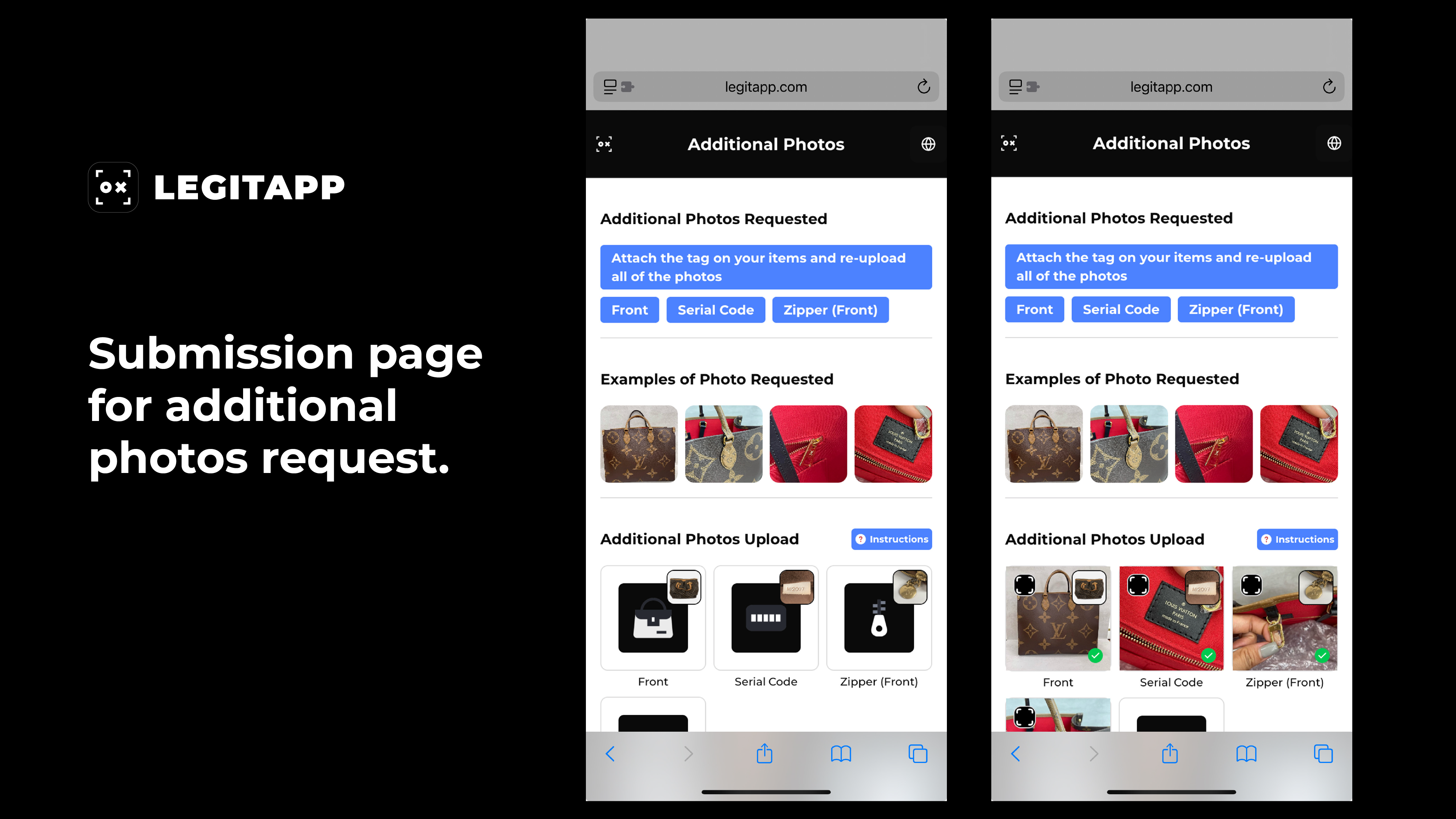
The recipient can click or paste the provided authentication URL into the browser to access the submission page. Follow the on-screen instructions, the recipient will be guided step by step through the process. Click the scan QR code button to start scanning the tag QR code if it is required. Depending on the authentication status, the URL can:
- Submit a new authentication, or
- Upload additional photos to an existing authentication.
Please note that the system will automatically assign the cheapest available authentication turnaround time. No manual selection is needed.
Step 3: Get result and/or instructions from webhook
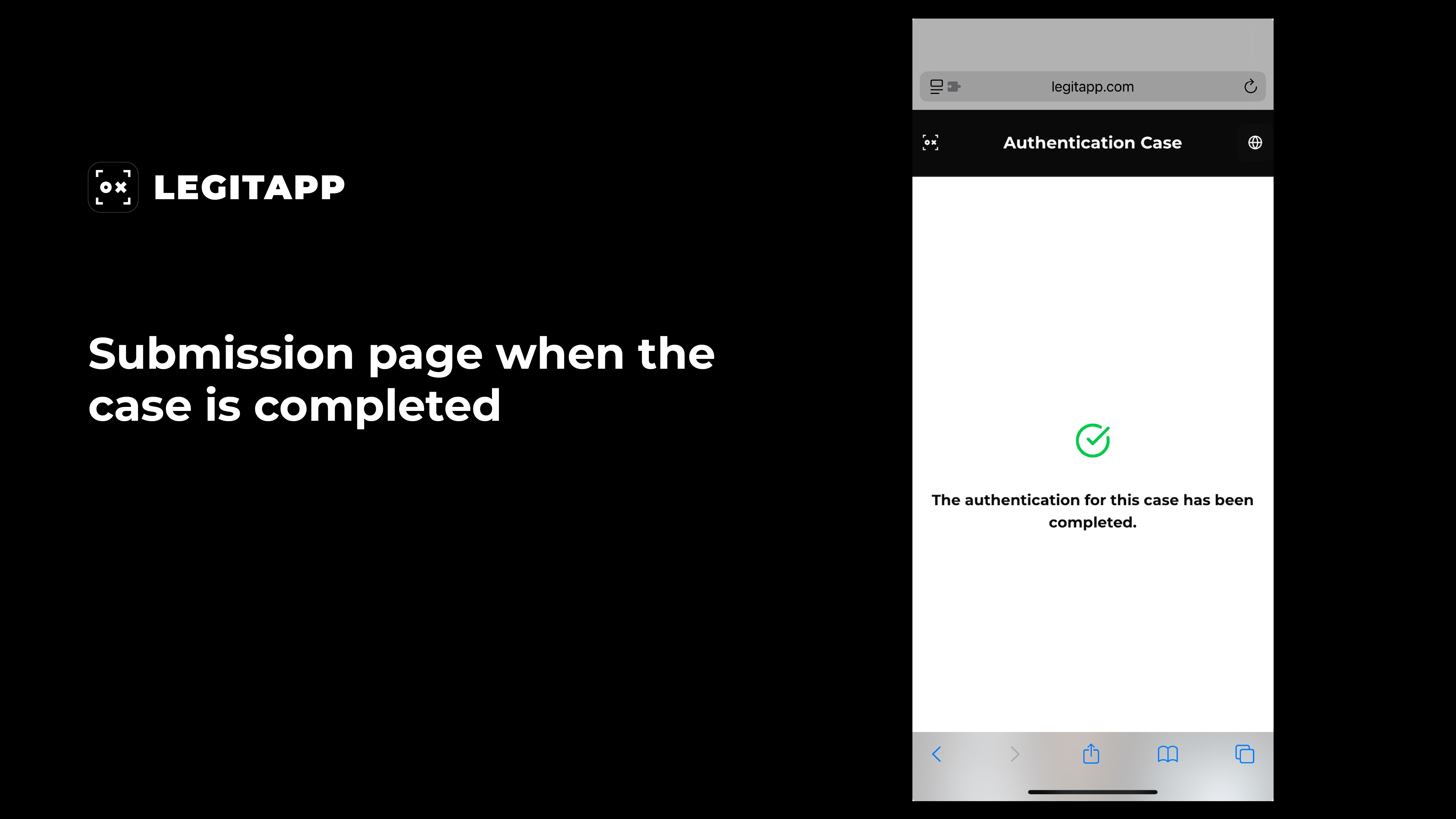
The results of the authentication will be sent to the webhook endpoint you registered in the Developer Portal.
API
Authorization
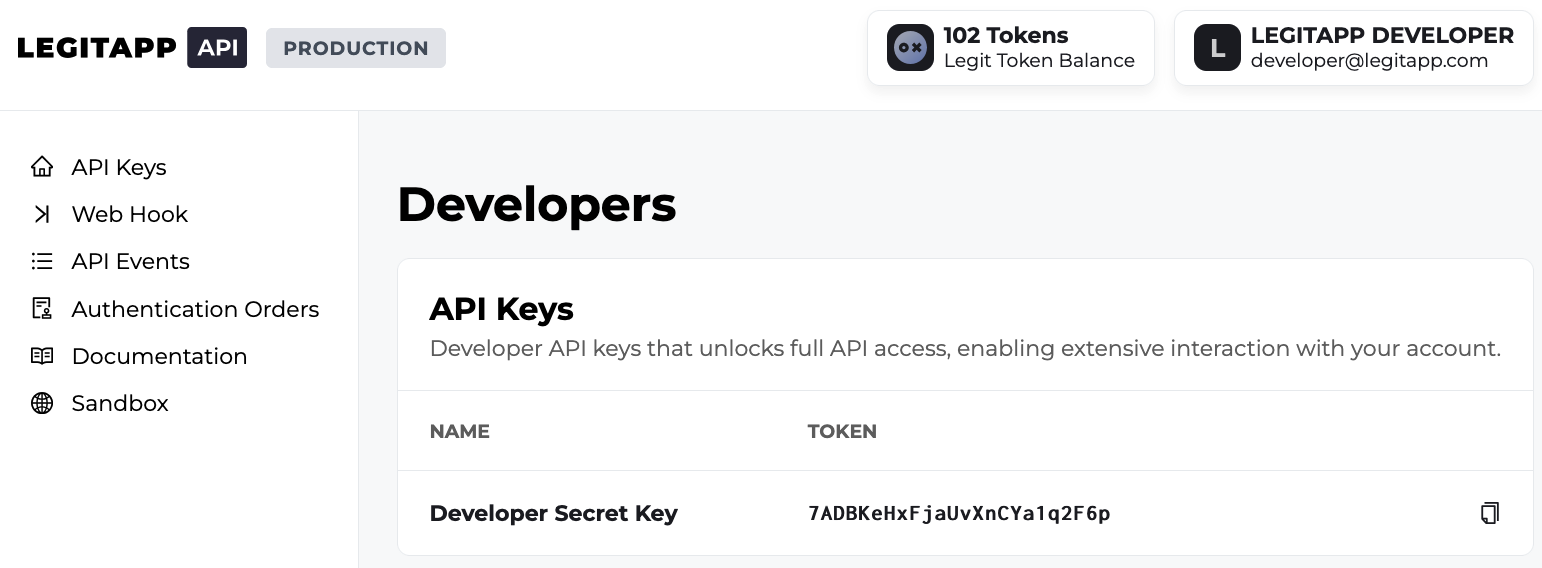
All API requests must be authorized with a developer secret key. Set this key in the HTTP Authorization header:
Authorization: Bearer YOUR_DEVELOPER_SECRET
Developer Secret Key
The developer secret key can be accessed in your developer account
Example Code
This example demonstrates how to use TypeScript with Express to make LegitApp API calls and handle webhook events from the LegitApp server
https://github.com/legitappcom/legitapp-developer-api-example
Postman collection for testing this sample code:
Download the Postman collection
Base URL
Production: https://developer-api.legitapp.com/v1
Endpoints
-
Get Category List
GET/product_categoryTo get a list of supported categories. The id of the selected category is required for other endpoints.
Headers
Name Type Description Authorization* String Bearer {{DEVELOPER_SECRET_KEY}}Accept-Language String Language of category title. In English by default. Supporting language codes: 1. English - en2. Polish -pl3. Chinese (Simplied) -zh-Hans4. Chinese (Traditional) -zh-Hant5. Japanese -ja-
cURL Example:
GEThttps://developer-api.legitapp.com/v1/product_categorycurl --location 'https://developer-api.legitapp.com/v1/product_category' \--header 'Content-Type: application/json' \--header 'Authorization: Bearer YOUR_DEVELOPER_SECRET'--header 'Accept-Language: en' -
200: OK
{"data": [{"id": 1, // category id"title": "Sneakers", // multi-lang supported"icon_image_url": "https://legitapp-prod.oss-accelerate.aliyuncs.com/2022121855af36a336d46fa9.png"},{"id": 2, // category id"title": "Streetwear", // multi-lang supported"icon_image_url": "https://legitapp-prod.oss-accelerate.aliyuncs.com/2020080594643c63fba91706.png"},]} -
404: Not Found
{"errors": [{"id": "NOT_FOUND","message": "We couldn't find the resources. Please check and try again.","code": 404,}]}
-
-
Get Brand List
GET/product_brandTo get a list of supported brands based on the selected category. The id of the selected brand is required for other endpoints.
Headers
Name Type Description Authorization* String Bearer {{DEVELOPER_SECRET_KEY}}Query Parameters
Name Type Description category_id* Number id in category object -
cURL Example:
GEThttps://developer-api.legitapp.com/v1/product_brand?category_id=1curl --location 'https://developer-api.legitapp.com/v1/product_brand?category_id=1' \--header 'Content-Type: application/json' \--header 'Authorization: Bearer YOUR_DEVELOPER_SECRET' -
200: OK
{"data": [{"id": 1, // brand id"title": "Air Jordan","slug": "air-jordan","icon_image_url": "https://legitapp-prod.oss-accelerate.aliyuncs.com/20200805a364b32e39ccf854.png"},{"id": 2, // brand id"title": "Nike","slug": "nike","icon_image_url": "https://legitapp-prod.oss-accelerate.aliyuncs.com/202008057146e477927daff3.png"},]} -
404: Not Found
{"errors": [{"id": "NOT_FOUND","message": "We couldn't find the resources. Please check and try again.","code": 404,}]}
-
-
Get Model List
GET/product_modelTo get a list of supported models based on the selected category and brand. The id of the selected model is required for other endpoints.
Headers
Name Type Description Authorization* String Bearer {{DEVELOPER_SECRET_KEY}}Query Parameters
Name Type Description category_id* Number id in category object brand_id* Number id in brand object -
cURL Example:
GEThttps://developer-api.legitapp.com/v1/product_brand?category_id=1&brand_id=1curl --location 'https://developer-api.legitapp.com/v1/product_model?category_id=1&brand_id=1' \--header 'Content-Type: application/json' \--header 'Authorization: Bearer YOUR_DEVELOPER_SECRET' -
200: OK
{"data": [{"id": 1, // model id"title": "Jordan 1","icon_image_url": "https://legitapp-prod.oss-accelerate.aliyuncs.com/20200805ad9a76acf6fb75f1.png"},{"id": 2, // model id"title": "Jordan 2","icon_image_url": "https://legitapp-prod.oss-accelerate.aliyuncs.com/202008057200b9222fb14047.png"},]} -
404: Not Found
{"errors": [{"id": "NOT_FOUND","message": "We couldn't find the resources. Please check and try again.","code": 404,}]}
-
-
Create Authentication Intent
POST/authentication_intentAfter submitting an authentication, $LEGIT Tokens will be deducted according to the selected turnaround time, and an authentication ID will be provided.
Headers
Name Type Description Authorization* String Bearer {{DEVELOPER_SECRET_KEY}}Body Parameters
Name Type Description category_id Number optional; id in endpoint 1 brand_id Number optional; id in endpoint 2 model_id Number optional; id in endpoint 3 tag_enabled Boolean optional; truemeans a physical tag is required.falseby default. Only supported for the following categories:
• Sneakers
• Luxury Handbags
• Luxury Clothing
• Luxury Shoes
• Luxury Jewelry / Accessories
• Luxury Watchesuser_custom_code_enabled Boolean optional; truemeans a custom code is required.falseby defaultuser_custom_code String optional language String optional; language of the submission page, in English by default. Supporting language codes:
1. English -en
2. Polish -pl
3. Chinese (Simplied) -zh-Hans
4. Chinese (Traditional) -zh-Hant
5. Japanese -ja
6. Korean -ko
7. Spanish -es-
cURL Example:
POSThttps://developer-api.legitapp.com/v1/authentication_intentcurl --location 'https://developer-api.legitapp.com/v1/authentication_intent' \--header 'Content-Type: application/json' \--header 'Authorization: Bearer YOUR_DEVELOPER_SECRET' \--data '{"category_id": 1,"brand_id": 1,"model_id": 1,"tag_enabled": true,"user_custom_code_enabled": true,"user_custom_code": "item-custom-code","language": "en", // en/zh-Hant/zh-Hans/ja/pl}' -
200: OK
{"authentication_intent_id": "4147106584014339","authentication_url": "https://submit.legitapp.com/zh-Hant/authentication/ailive32fc0b5ebc14afc40a559990215295ce73ea94ac543b45e395d79ac82c6c8ecbe798dedc67ae8cc4acd8f5333a2f7201673844d9449a448939656250e876b53387741c9620b8755c807c48bf27ca7b10f801e01e1ef0128bc6802f8b6514a0c8f3b3124024e8d985993303ad152fda7aedc76e4336cb5f4e92","expired_at": "2025-10-05T10:35:32.447Z"} -
404: Not Found
{"errors": [{"id": "NOT_FOUND","message": "We couldn't find the resources. Please check and try again.","code": 404,}]}
-
Webhook
Receive LegitApp events in your webhook endpoint
Listen to events in your LegitApp Developer account on your webhook endpoint so your backend systems can automatically execute actions accordingly.
Create an event destination to receive events at an HTTPS webhook endpoint. After you register a webhook endpoint in the Developer Portal, LegitApp can push real-time event data to your application’s webhook endpoint when events happen in your developer account. LegitApp uses HTTPS to send webhook events to your app as a JSON object that includes an Event object.
Get Started
To start receiving webhook events in your server:
- Create a webhook endpoint handler to receive event data POST requests.
- Register your endpoint in the LegitApp Developer Portal.
- Test your webhook endpoint handler.
1. Create a Webhook Endpoint Handler
Set up an HTTP or HTTPS endpoint function that can accept webhook requests with a POST method. If you’re still developing your endpoint function on your local machine, it can use HTTP. After it’s publicly accessible, your webhook endpoint function must use HTTPS.
Set up your endpoint function so that it:
- Handles POST requests with a JSON payload consisting of an Event object
- Quickly returns a successful status code (
200) prior to any complex logic that could cause a timeout.
// This example uses Express to receive webhooks
const express = require('express');
const app = express();

app.post('/webhook', (request, response) => {
  const event = request.body;

  // Handle the event
  switch (event.type) {
    case 'authentication.initial_photo_submission':
      // handleAuthenticationInitialPhotoSubmission(event);
      break;
    case 'authentication.new_message':
      // handleAuthenticationNewMessage(event);
      break;
    case 'authentication.extra_photo':
      // handleAuthenticationExtraPhoto(event);
      break;
    case 'authentication.extra_photo_submission':
      // handleAuthenticationExtraPhotoSubmission(event);
      break;
    case 'authentication.completed':
      // handleAuthenticationCompleted(event);
      break;
    // ... handle other event types
    default:
      console.log(`Unhandled event type ${event.type}`);
  }

  // Return a response to acknowledge receipt of the event
  return response.sendStatus(200);
});

// Listen to the port used in your application
app.listen(4242, () => console.log('Running on port 4242'));
2. Register and Configure Your Webhook Endpoint
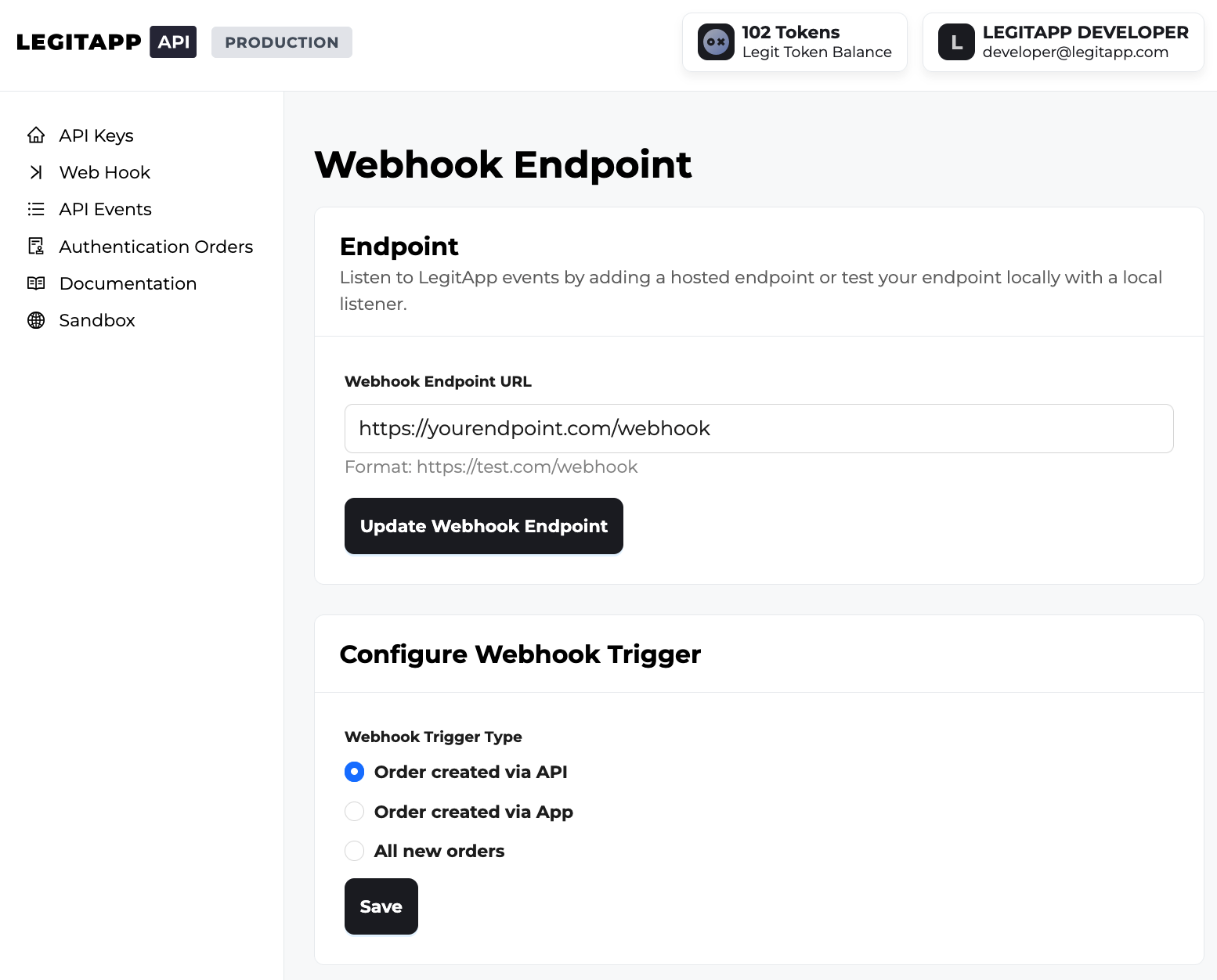
Visit https://developer.legitapp.com and go to the Web Hook section. Input your server’s destination endpoint URL into the Webhook Endpoint URL field.
You may also choose which order origins should trigger a webhook notification. You can filter events based on your integration needs:
- Order created via API (Default): Only receive events for orders submitted via API
- Order created via App: Only receive events for orders submitted via our App.
- All new orders: Receive events for all orders associated with your business account, regardless of the submission source.
3. Test Your Handler
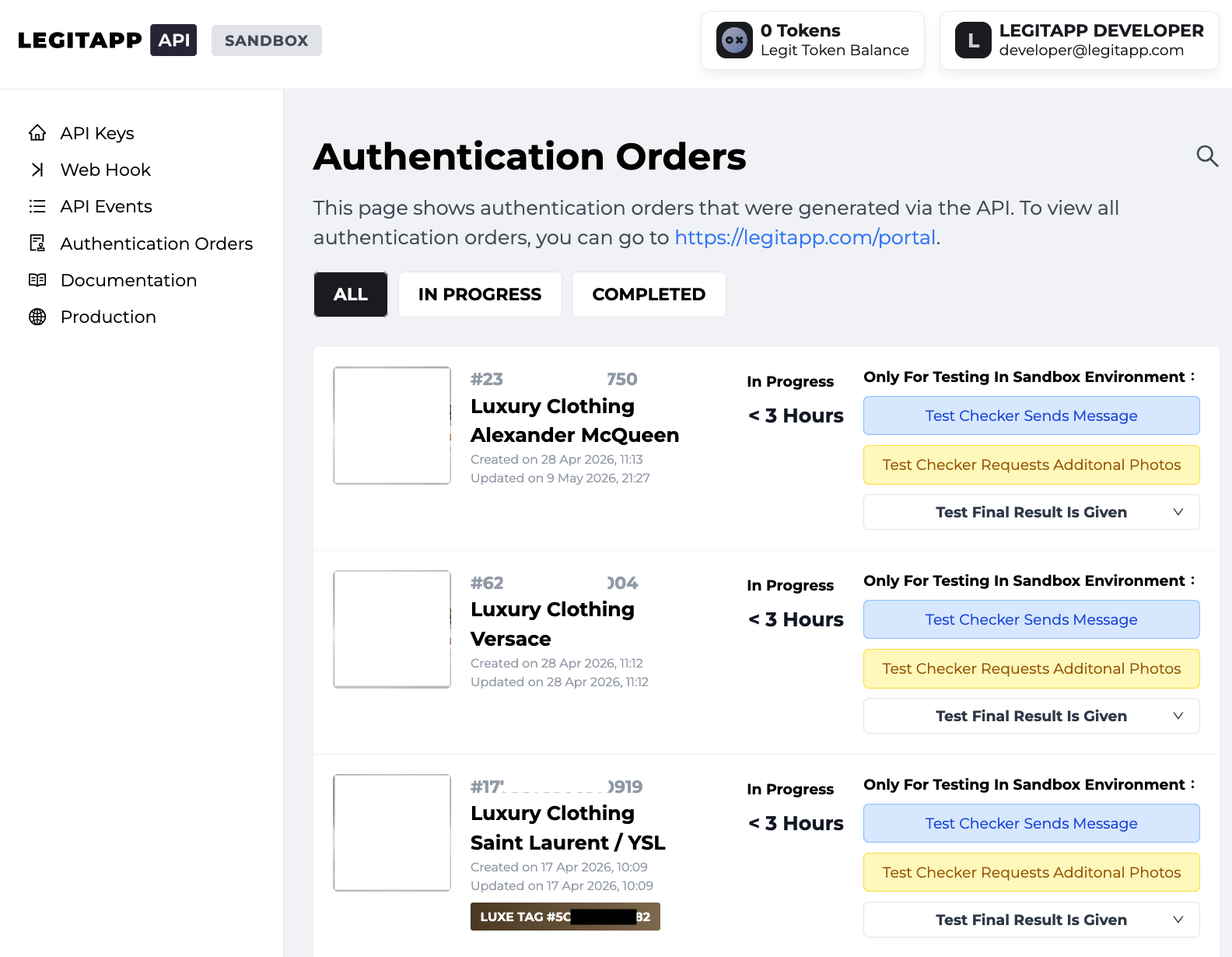
Testing your webhook logic is the most critical step before moving to production. Before deploying your integration to production, we highly recommend verifying your logic using our Sandbox Testing Environment.
- Navigate to Orders: Go to the Authentication Orders section to view a list of orders created via the API in your Sandbox environment.
- Filter by Status: Select the IN PROGRESS tab. Since webhook events are only triggered by active cases, this view allows you to focus on orders ready for testing.
- Simulate Events: Within the Sandbox, you can manually trigger three specific event types to ensure your system processes each event type correctly.
Types of Event
-
authentication.cancelled
-
Triggered when an administrator cancels the authentication at your request
-
Example:
{"id": "event_34jefj424cd84kr46a67f7fd95jv6a","object": "event","api-version": "v1","created_at": "2025-01-01 00:00:00","livemode": true,"type": "authentication.cancelled","data": {"event_type": "authentication.cancelled","authentication_id": "1234567890123456","authentication_token": 10,"user_custom_code": "ABC 1-2 Hermes","status": "cancelled","cancelled_by": "administrator","cancelled_at": "2025-01-01 00:00:00"},}
-
-
authentication.initial_photo_submission
-
Triggered when a new authentication is successfully created
-
Example:
{"id": "event_4203sj112c5edd324a62f7fd9ad8e0","object": "event","api-version": "v1","created_at": "2025-01-01 00:00:00","livemode": true,"type": "authentication.initial_photo_submission","data": {"event_type": "authentication.initial_photo_submission","authentication_id": "1234567890123456","authentication_token": 10,"user_custom_code": "ABC 1-2 Hermes",},}
-
-
authentication.new_message
-
Triggered when our checkers send you a new message
-
Example:
{"id": "event_5201ah754c5ebc762a66f7fd9ad7d9","object": "event","api-version": "v1","created_at": "2025-01-01 00:00:00","livemode": true,"type": "authentication.new_message","data": {"event_type": "authentication.new_message","authentication_id": "1234567890123456","authentication_token": 10,"user_custom_code": "ABC 1-2 Hermes","content": "Please take another photo with flashlight ON"},}
-
-
authentication.extra_photo
-
Triggered when our checkers request for extra photo(s)
-
Example:
{"id": "event_a8fm30ff8s5eb87gn3kd7gbd9accna","object": "event","api-version": "v1","created_at": "2025-01-01 00:00:00","livemode": true,"type": "authentication.extra_photo","data": {"event_type": "authentication.extra_photo","authentication_id": "1234567890123456","authentication_token": 10,"user_custom_code": "ABC 1-2 Hermes","checker_extra_example_image_urls": "https://legitapp-prod.oss-cn-hongkong.aliyuncs.com/20250102dn3n4aa40613551a.jpg,https://legitapp-prod.oss-cn-hongkong.aliyuncs.com/20250102dn3n4aa7fj4l33nf.jpg","checker_extra_part_image_required": "Exterior Outer (Left), Box Label","checker_extra_remark": "Please use camera flash.","placeholder": [ // a list of required photos{"title": "Exterior Outer (Left)","image_url": "https://legitapp-prod.oss-cn-hongkong.aliyuncs.com/20210126b831199eb4dd177d.png","example_image_url": "https://legitapp-prod.oss-cn-hongkong.aliyuncs.com/202009093d63c684a9ef68e5.png","description": "Pinch to zoom and tap to focus.\nPhotograph your product in full.",},{"title": "Box Label","image_url": "https://legitapp-prod.oss-cn-hongkong.aliyuncs.com/2020080512f59cb060ef1976.png","example_image_url": "https://legitapp-prod.oss-cn-hongkong.aliyuncs.com/202010191ba8a6f7a28699a6.png","description": "Pinch to zoom and tap to focus.\nPhotograph your product in full.",},]},}
-
-
authentication.extra_photo_submission
-
Triggered when extra photos are successfully submitted
-
Example:
{"id": "event_6944df724c5ebb766a66f7fd9a5a5d","object": "event","api-version": "v1","created_at": "2025-01-01 00:00:00","livemode": true,"type": "authentication.extra_photo_submission","data": {"event_type": "authentication.extra_photo_submission","authentication_id": "1234567890123456","authentication_token": 10,"user_custom_code": "ABC 1-2 Hermes",},}
-
-
authentication.completed
-
Triggered when our checkers have completed your authentication
-
Example:
{"id": "event_7423fj424c5ebb746a67f7fd9a2j33","object": "event","api-version": "v1","created_at": "2025-01-01 00:00:00","livemode": true,"type": "authentication.completed","data": {"event_type": "authentication.completed","authentication_id": "1234567890123456","authentication_token": 10,"user_custom_code": "ABC 1-2 Hermes","result": "authentic", // authentic/replica/inconclusive"certificate_url": "https://legitapp.com/en/cert/1234567890123456"},}certificate_urlis only available in Production environment and when the result is either authentic OR replica
-
Event Delivery Retry
If your webhook endpoint fails to return a successful response, LegitApp is able to attempt to redeliver the event.
-
Automated Retry Schedule
LegitApp makes a total of 3 attempts to deliver an event. If an attempt fails, the retry schedule is as follows:
- Initial Attempt: Triggered immediately upon the event occurrence.
- Second Attempt: Triggered 30 minutes after the first failure.
- Third (Final) Attempt: Triggered 1 hour after the second failure.
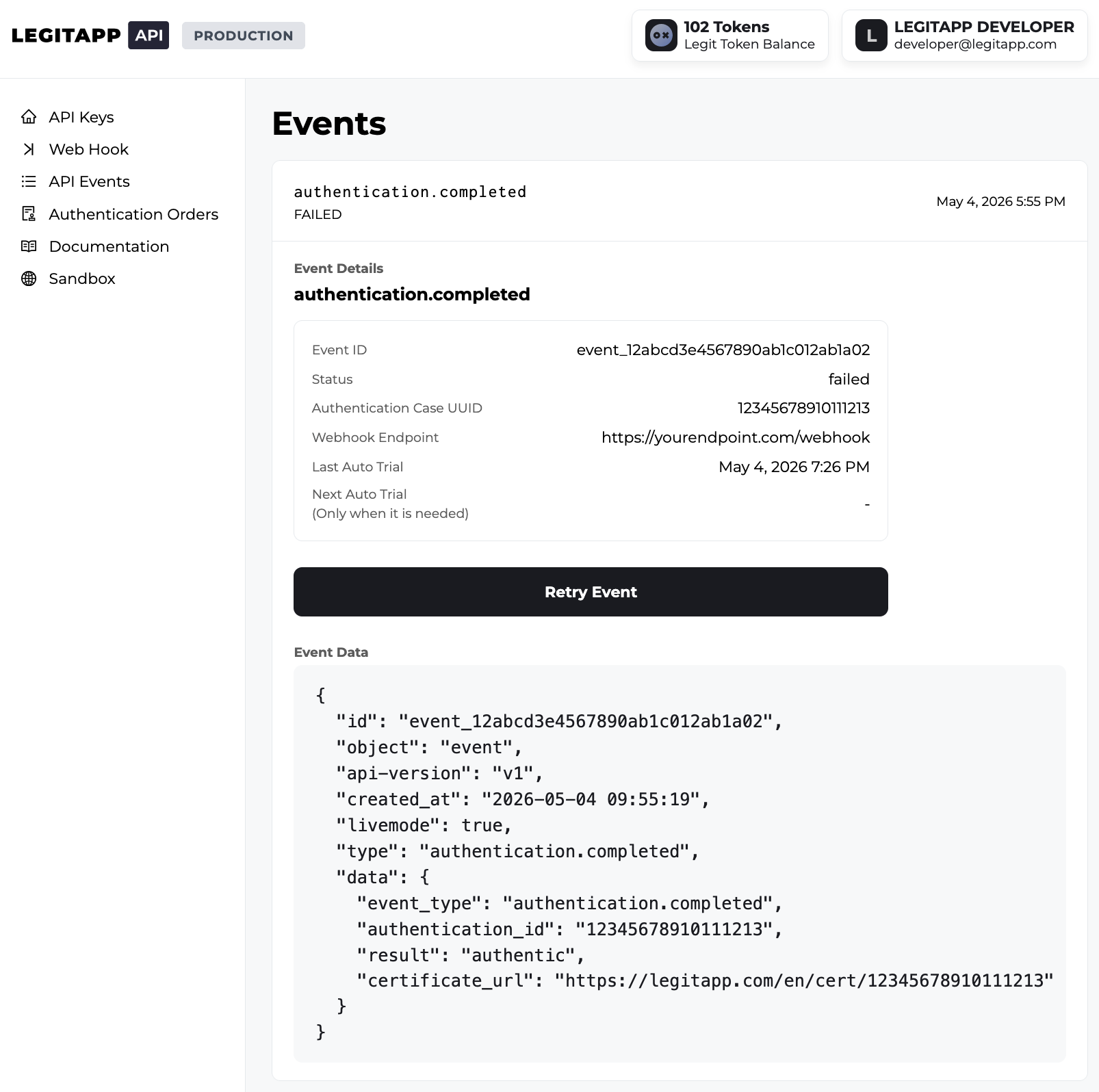
You can monitor the status of these attempts and see exactly when the next retry is scheduled by visiting the Events page in the Developer Portal.
-
Manual Retries
In addition to automated retries, you have the option to manually trigger a redelivery for any individual event. This is particularly useful for testing your endpoint's error handling or recovering from a temporary server outage.
To manually retry an event, go to the Events list in your Developer Portal and click the "Retry Event" button next to the desired log entry.
Errors
Error Object Structure
{
    "errors": [
        {
            "id": "INVALID_REQUEST",
            "message": "The request is invalid. Please check and try again.",
            "code": 400
        }
    ]
}
| Field | Description |
|---|---|
| id | A short, machine-readable identifier representing the specific error type. |
| message | A human-readable explanation of the error, often including hints to resolve the issue. |
| code | HTTP status code associated with the error. |
HTTP Status Code Summary
| Code | Title | Description |
|---|---|---|
| 200 | OK | Everything worked as expected. |
| 201 | Created | The server has successfully created a new resource |
| 400 | Bad Request | The request was unacceptable—usually due to missing or invalid parameters. |
| 401 | Unauthorized | No valid authentication credentials provided. |
| 403 | Forbidden | The user does not have permission to perform this action. |
| 404 | Not Found | The requested resource does not exist. |
| 500 | Internal Server Errors | A server-side failure occurred. These are rare but possible. |
| 503 | Service Unavailable | Website's server is temporarily unable to handle your request. |
Error ID Reference Table
| Error ID | Description |
|---|---|
| PARAM_REQUIRED | One or more required parameters are missing. Include all required fields and try again. |
| EXCEED_UPLOAD_LIMIT | The uploaded file exceeds the maximum allowed size. Reduce the file size and retry. |
| VALIDATION_ERROR | One or more parameters failed validation. Verify all input fields and try again. |
| INVALID_REQUEST | The request is malformed or contains invalid data. |
| DUPLICATED_RECORD | A record with the same data already exists and cannot be created again. |
| INVALID_LOGIN_USER | The user account is disabled and cannot be used to log in. |
| INVALID_TOKEN | The provided authentication token is invalid. |
| EXPIRED_TOKEN | The login session has expired. Please sign in again. |
| INVALID_PERMISSION | The user does not have permission to access this resource. |
| NOT_FOUND | The requested resource could not be found. |
| INTERNAL_SERVER_ERROR | An unexpected server error occurred. Please try again later. |